Searching
Find a name or a string in the diff and jump straight to it. / searches the file you’re in. g/ searches every changed file in full, old and new versions both.
Search the current file
Section titled “Search the current file”- Press
/. A Search this file… bar opens under the top bar. Text you had selected fills it in. Otherwise the last query is still there. - Type. Matches highlight on both sides of the diff as you go, and the counter shows the total.
- Press
Enterto go to the first match. The keyboard goes back to the diff, and the counter changes to3 / 17. - Press
nfor the next match andNfor the previous one. Both take a count, so5nskips ahead five. - Press
Escto close the bar./brings the same query back.
Shift+Enter in the bar goes to the previous match.
The search is literal and smart case: lowercase text matches any case, and a query with a capital letter matches case exactly. user finds User and user, and User finds only User.
It only covers lines the diff shows: changed lines and their context. To search the whole file, use g/.
Limits on /
Section titled “Limits on /”- A file stops at 5000 matches, and the counter shows
5000+with “Match limit reached, some matches are not shown”. - A line longer than 5000 characters is only searched in its first 5000, and the bar says so.
- A file showing Changed since last review can’t be searched.
/there says “Search isn’t available in the changes-since-last-review view.”
Search all changed files
Section titled “Search all changed files”- Press
g/. The Search all changed files… panel opens. - Type a query. Results arrive after a short pause and group under each file path. Each row shows the side (
oldornew), the line number, and the line with the match highlighted. - Use the arrow keys to pick a result and press
Enterto jump there. Focus moves to the result list, soj,kandEnterkeep stepping through results./returns to the query box. - Press
Ctrl+oto go back to where you were before the jump. - Press
Escto close the panel.g/reopens it with the last query.
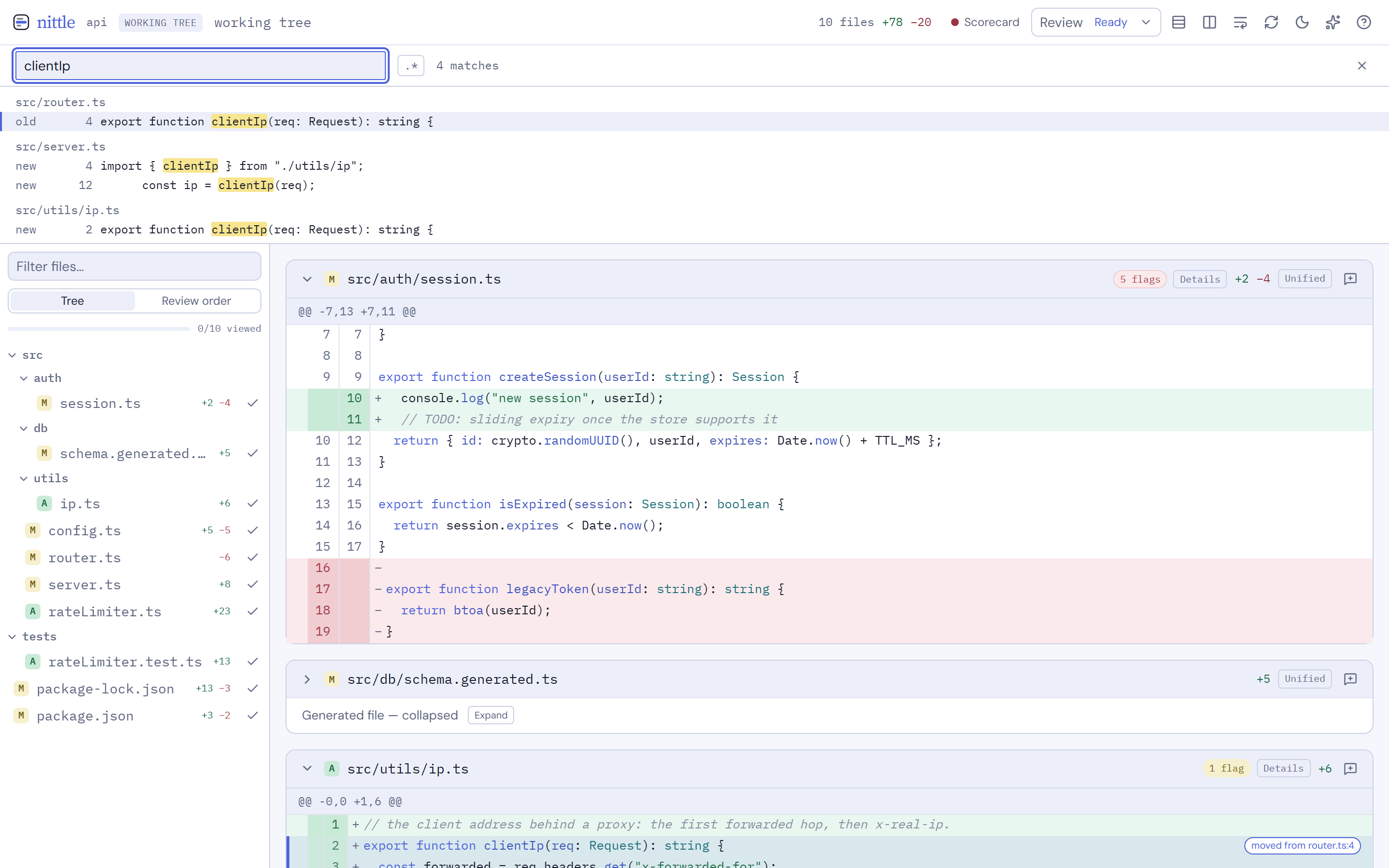
g/ reads whole files, not just the hunks. For each changed file it searches the old version and the new version. A deleted file only has an old side, an added file only a new side, and binary files are skipped. A hit on a line outside the diff lands on the nearest line the diff shows.
The panel stays open after a jump, so the next hit is one keypress away. A collapsed or generated file opens up when you jump into it.
Search with a regex
Section titled “Search with a regex”Click .* in the panel to switch the query to a regular expression. It uses JavaScript regex syntax and the same smart case rule. Escapes like \S don’t count as capital letters.
handle(Get|Post)Request\(A bad pattern shows its error under the query instead of results:
invalid regex: Invalid regular expression: missing )A pattern that nests one repeated group inside another, such as (a+)+ or (.*)*, is refused before it runs, since it can take forever on the wrong line:
pattern has a repeated group inside a repeated group and could hang the search; simplify itRegex searches run in a separate worker that nittle kills when the search runs out of time, so a slow pattern can’t hang the review.
Limits on g/
Section titled “Limits on g/”- 500 results at most. Past that the count reads
500+and the list ends with “Showing the first matches only. Narrow the query to see the rest.” - A line returns at most 50 matches, and a line over 5000 characters is only searched in its first 5000.
- Files over 2 MB are skipped, and a search reads at most 16 MB in total. Either one marks the results as partial.
- Each file gets 250 ms. A file that takes longer stops early, and the results are marked partial.
- A whole regex search gets 2 seconds. Past that the worker is killed and the panel shows “pattern took too long; try a simpler regex”.
- At most two searches run at once and four more wait. Past that the server answers “too many searches running, try again”.
Related pages
Section titled “Related pages”- Move around the diff with Keyboard review.
- Follow a name to its definition with Code navigation.